
अगर आप AC Repairing, AC Service या Air Conditioner Repair Business के लिए professional visiting card design बनाना चाहते हैं, तो यह editable CorelDRAW CDR File आपके लिए उपयोगी हो सकती है।
इस visiting card design को 88×55 MM size में customize किया जा सकता है। आप उपलब्ध editable elements के अनुसार अपना AC Repair Business Name, Technician Name, Mobile Number, WhatsApp Number, Address और AC Services की जानकारी जोड़ सकते हैं।
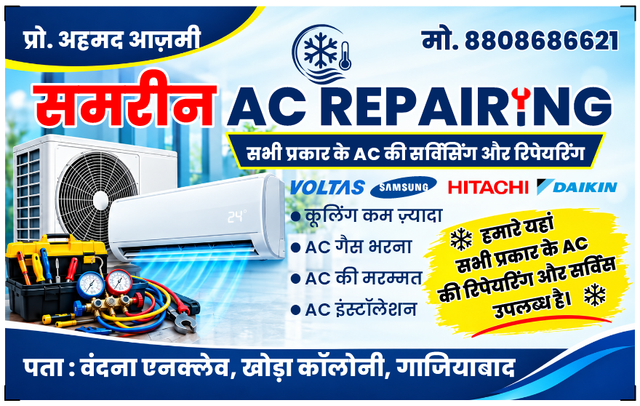
💻 Software Required : CorelDRAW | 📂 File Type: CDR (Editable)
🆚 Supported Versions: X7 / X8 / 2019 / 2020 / 2021 / 2022 / 2023 / 2024 / 2025 / 2026
🔤 Fonts: Included | 📦 File Size: 4.4 MB | 🎨 Design By: Ahmad Azmi
⏳ Your download link will appear in 15 seconds... Please read the details above.
AC Repairing Visiting Card CDR File क्या है?
AC Repairing Visiting Card CDR File एक editable CorelDRAW business card design है, जिसे AC technician, AC repair professional या air-conditioner service business की जरूरत के अनुसार customize किया जा सकता है।
इसमें उपलब्ध editable elements के अनुसार आप business name, contact details, service information और अन्य जरूरी details को बदलकर अपना professional visiting card तैयार कर सकते हैं।
AC Repairing Visiting Card CDR File कैसे Download करें?
Step 1. Download CDR File button पर क्लिक करें।
Step 2. CDR file को अपने computer में save करें।
Step 3. यदि legally distributable fonts उपलब्ध हैं, तो उन्हें भी download करें।
Step 4. Required fonts install करें।
Step 5. CorelDRAW software में CDR file open करें।
Step 6. अपने AC Repairing Business की सही details update करें।
Step 7. Final 88×55 MM design check करके printing के लिए भेजें।
CorelDRAW में AC Visiting Card कैसे Edit करें?
1. CorelDRAW software open करें।
2. Download की गई CDR file खोलें।
3. Business Name को अपने business name से replace करें।
4. Technician/Owner Name update करें।
5. Mobile और WhatsApp Number डालें।
6. Service Area और Address update करें।
7. AC services को अपनी actual services के अनुसार customize करें।
8. यदि editable हो तो अपना authorized logo लगाएं।
9. सभी spelling और contact details verify करें।
10. Final artwork save करके printing के लिए export/submit करें।
Disclaimer: यह page किसी AC manufacturer, HVAC company, appliance brand या government department की official website नहीं है, जब तक कि स्पष्ट रूप से ऐसा उल्लेख न किया गया हो।
यह resource AC Technician, AC Repair और Air Conditioner Service Business के लिए editable visiting card design उपलब्ध कराने के उद्देश्य से बनाया गया है।
यह design किसी technician की professional qualification, certification, brand authorization या service guarantee का प्रमाण नहीं है। ऐसी जानकारी केवल वास्तविक स्थिति के आधार पर ही प्रदर्शित करें।
अगर आपको इस पोस्ट से जुडी कोई समस्या है तो हमें कमेंट करके ज़रूर बताएं